Module Configuration
First, enable the module in System > Configuration. Fill in the settings below before saving.
Invoice Issuer Data
Provide all your company details in Invoice Issuer section. This data will appear as the seller on every invoice or receipt this module will issue.
Invoices Settings
Create Invoices - Choose whether invoices should be generated automatically after each order, or manually by you from the orders panel.
Document Type - Choose whether to issue VAT invoices (required if you are VAT-registered) or simple receipts.
Invoice Name Format - Defines how your invoice numbers will look. You can build a custom format using the variables below - each will be replaced with the actual value when the invoice is generated.
| Variable | Description | Example Values |
|---|---|---|
| {YEAR} | 4-digit year of the invoice date | 2026, 2027 |
| {MONTH} | Month of the invoice date, zero-padded to 2 digits | 01, 05, 11 |
| {ORDER_ID} | The associated order ID, with a numeric suffix for corrective invoices. Suffix is added for every invoice other than first for given order so the name is always unique. | X74B, A4B7, A4B7-2 (invoice correction) |
| {MONTHLY_NO} | Sequential number of this invoice within the current month. Resets to 1 at end of month. | 1, 2, 3... |
| {YEARLY_NO} | Sequential number of this invoice within the current year. Resets to 1 at end of year. | 1, 2, 3... |
Example: with the format "{YEAR}-{MONTH}-{ORDER_ID}", invoices will be named:
- 2026-05-X74B
- 2026-05-A4B7
- 2026-05-A4B7-2
Example: with the format "MYSHOP/{YEAR}/{MONTH}/{MONTHLY_NO}", invoices will be named:
- MYSHOP/2026/05/1
- MYSHOP/2026/05/2
- MYSHOP/2026/05/3
Make sure your format includes enough variables to guarantee every invoice has a unique name.
KSeF Integration (Polish companies only)
KSeF is the Polish national e-invoicing system, required by Polish tax law.
You can use the this module without KSeF, but in that case the generated documents are for your reference only - you will still need to submit all invoices to KSeF manually.
When KSeF is connected, invoices are submitted automatically and the generated PDFs will include a KSeF validation QR code.
To connect KSeF, you need a valid token from https://ap.ksef.mf.gov.pl/.
Go to Tokeny > Generuj Token, give the token any name you like, and make sure to tick both "read invoices" and "write invoices" permissions.
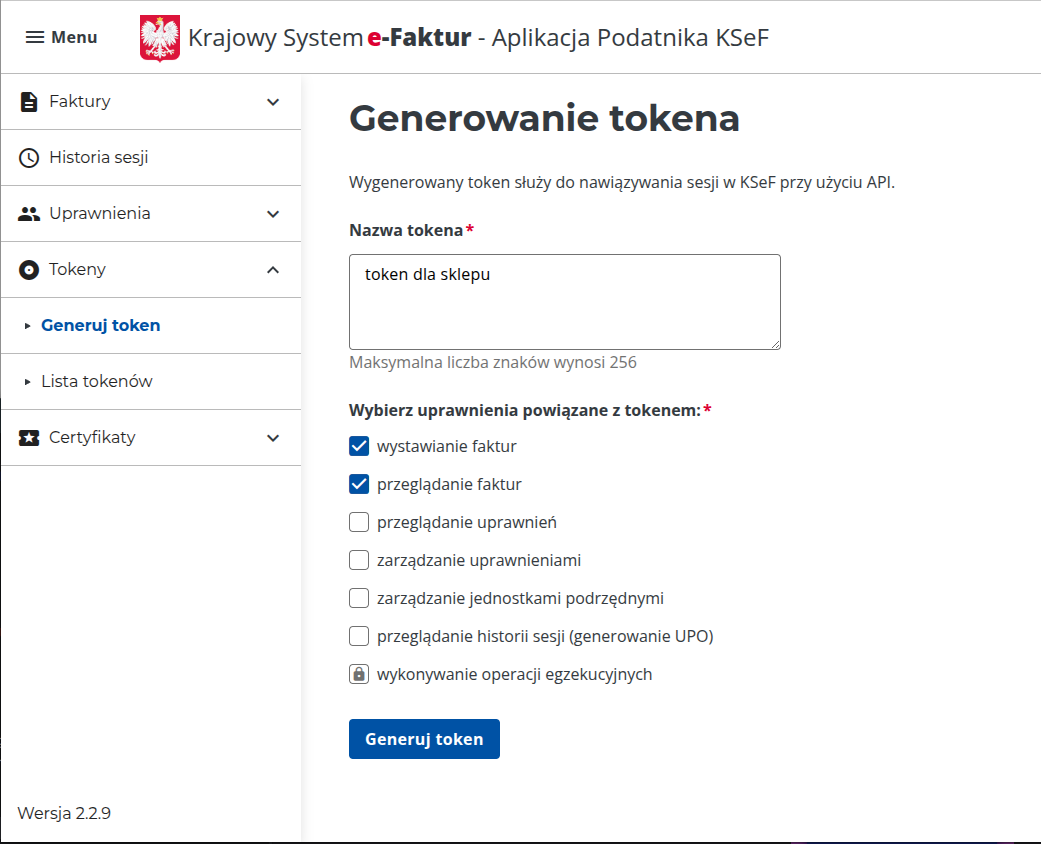
Now in your shop configuration, select Enable KSeF, paste this token into Ksef Token field and use test button to validate it and then save.
⚠️ Note: KSeF issues production invoices so it is a good idea to set
Create InvoicestoManualafter enabling KSeF integration. When you manually generate first few invoices and confirm with your accountant that they are correct you can switchCreate InvoicestoAutomatic